How To Make Birthday Invitations
How to Make Birthday Invitations: Create, Personalize, and Send Online

Planning a birthday party starts with a reason to celebrate—and an invitation that gets everyone excited to join you. Whether you're organizing a child's dinosaur-themed party, a milestone birthday, or a relaxed dinner with friends, your invitation should feel personal and make the important details easy to find.
But making birthday invitations shouldn't become a project of its own. You don't need graphic design experience, hours to adjust text boxes, or a printer stocked with expensive ink.
With Rizz Invites, you can create a birthday invitation using AI, choose an existing design, or upload one you already love. Then, bring your celebration together with digital delivery and online RSVPs.
Here's how to make birthday invitations, from choosing the look to getting your guest list organized.
Choose How You Want to Make Your Birthday Invitations
Before you start, decide how you'd like to create the invitation itself. You can begin with an idea, a ready-made design, or artwork you've already prepared.
Create a Custom Invitation With AI
Have a particular theme or look in mind? Start with a description rather than a blank canvas. Rizz Invites can generate a custom invitation image based on the party style you provide.
This is a useful starting point when your idea is more specific than a general birthday theme. Think of a space party with soft watercolor planets, a glamorous disco birthday, or a simple invitation for dinner at your favorite restaurant.
Choose a Ready-Made Birthday Invitation with a Choice to Personalize it
Prefer to browse for inspiration? Explore the collection of birthday invitations and choose a design that suits the celebration.
A ready-made invitation is a good starting point when you spot something you love and would rather spend your planning time choosing the cake, booking the venue, or deciding who to invite.
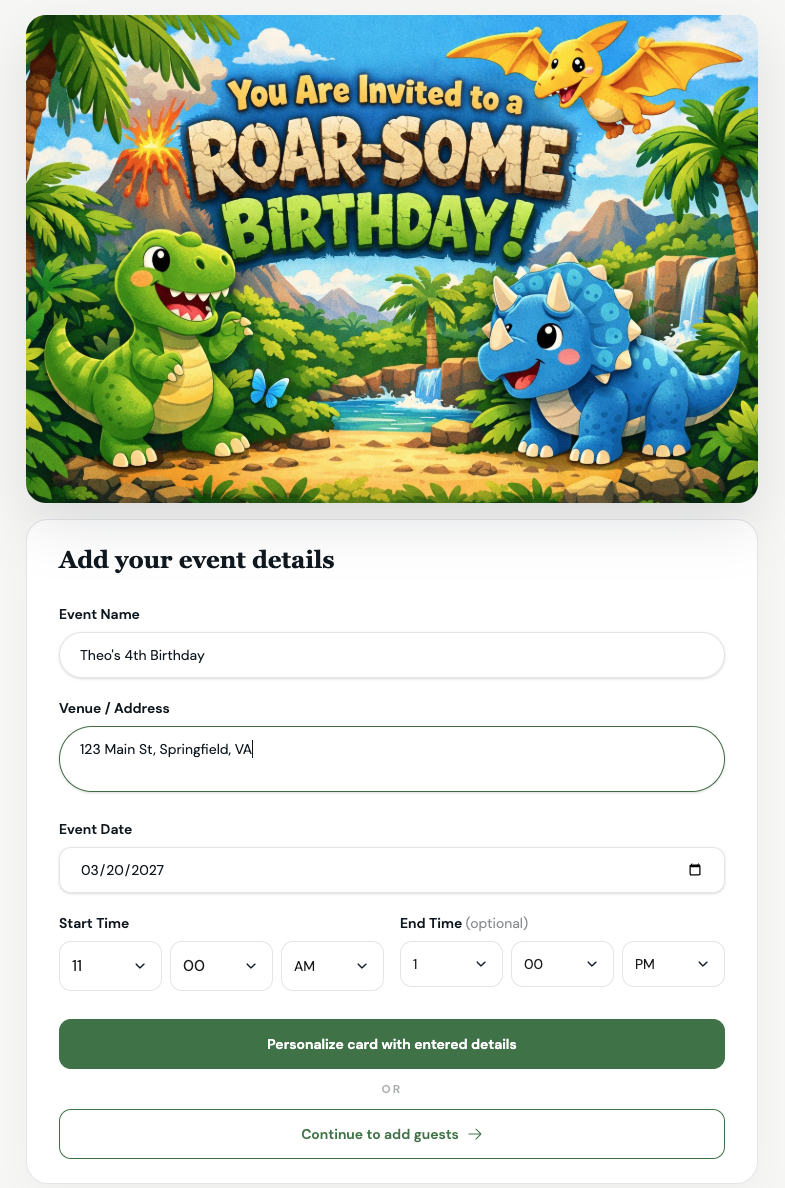
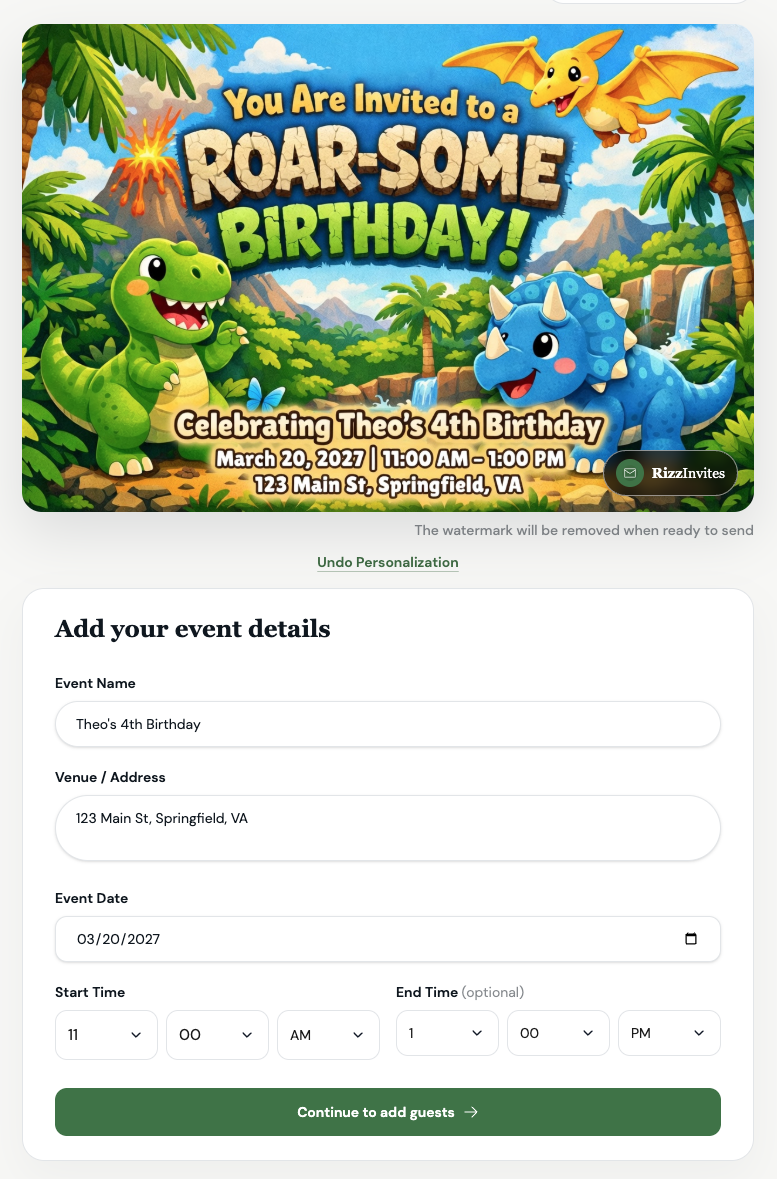
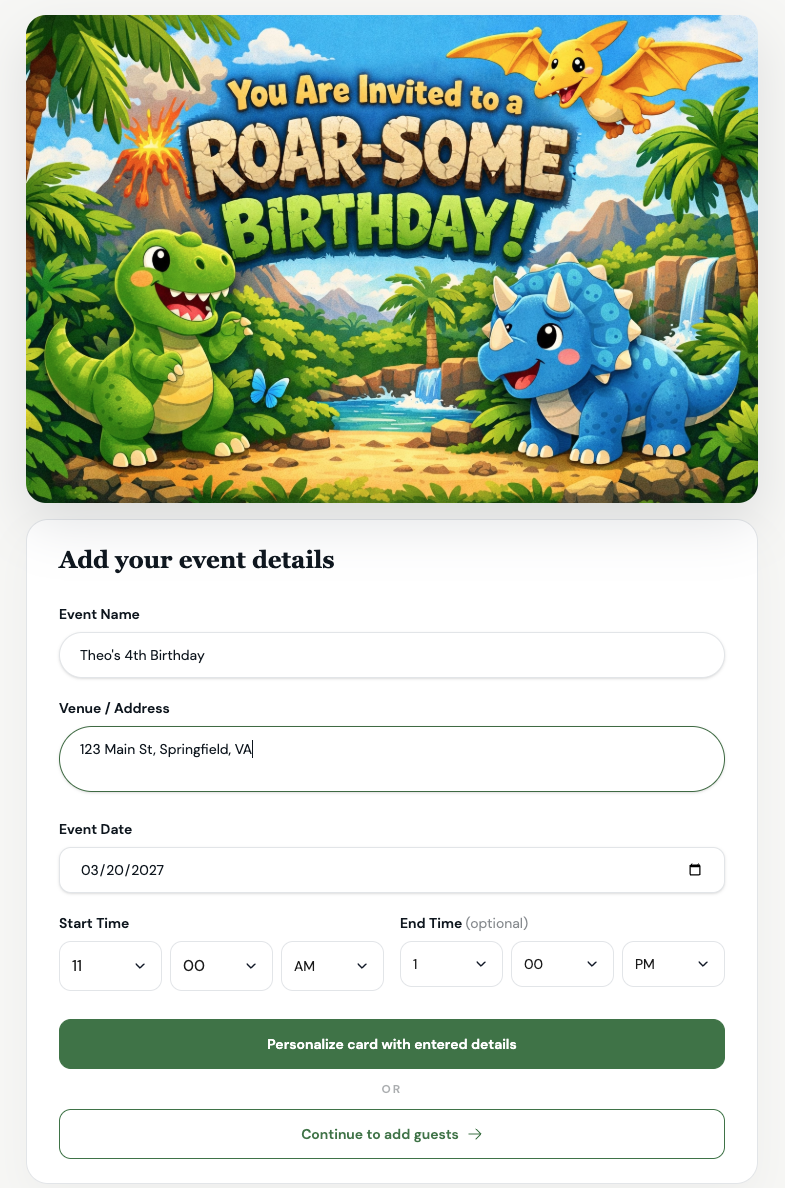
You can always go a step further and personalize the chosen card with entered details. Takes only a few seconds. Like this:
Start by entering your event details:
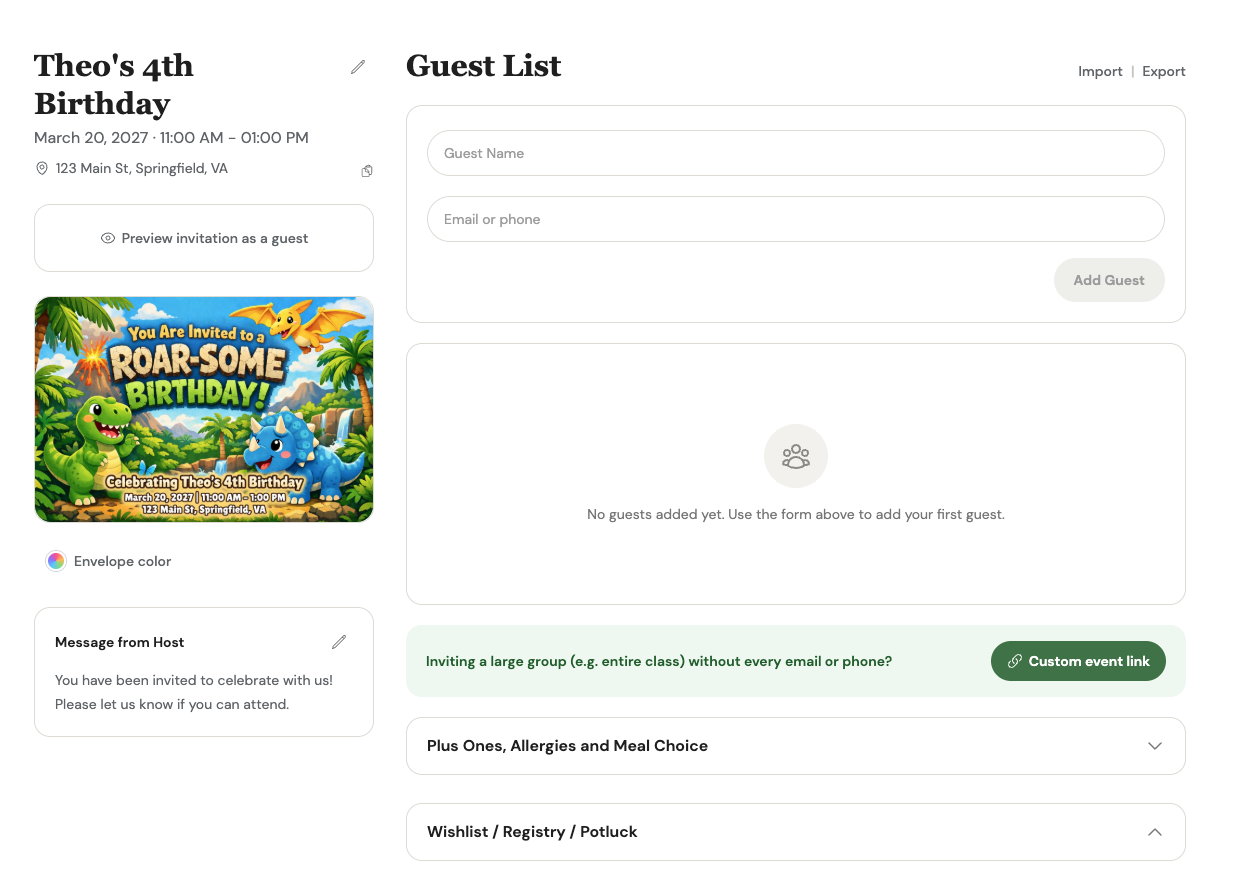
Click "Personalize" and get this:
Upload a Design You Already Have
Already made an invitation or had one designed for you? You can upload your own invitation image to Rizz Invites and use it for your event.
You don't have to give up a design you love to organize your invitations and guest responses in one place.
Traditional printed invitations are another option, particularly when you want a physical keepsake. Just plan for printing, distribution, and a separate way for guests to RSVP.
How to Make Birthday Invitations With the Invitation Maker
To design a card from your own idea, open the Rizz Invites invitation maker. You'll start with the event theme and can add a photo and optional event details.
1. Describe Your Birthday Party Theme
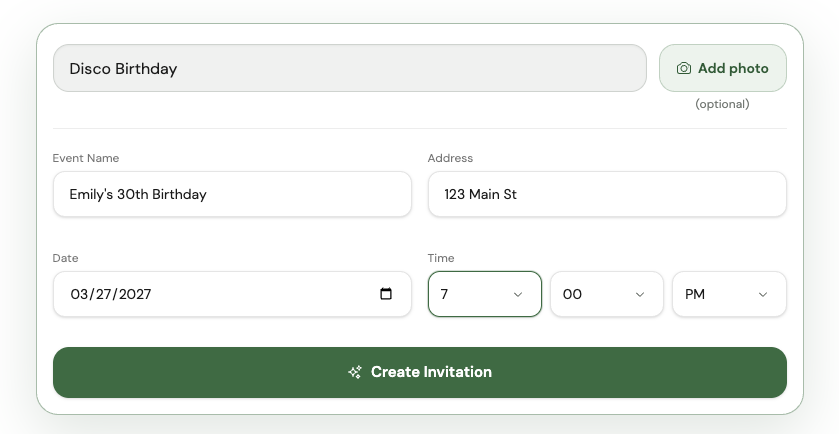
Enter the theme, style, or overall mood you have in mind. Rather than stopping at “birthday party,” describe the colors, visual elements, and feeling you'd like the invitation to have.
For example:
A playful dinosaur birthday invitation for a fifth birthday, with friendly dinosaurs, tropical leaves, and bright green and orange colors.
Or:
A modern birthday dinner invitation with a deep blue background, delicate white lettering, and an elegant candlelit restaurant feel.
You don't need technical design language. Try describing the invitation as though you were explaining your idea to a friend. Choose a few details that matter most instead of combining several competing themes.
2. Decide Whether to Include a Photo and Event Details
You can add a photo for a more personal invitation.
The maker also gives you the option to include event information directly on the card, such as the event name, venue, date, and time. Alternatively, generate the artwork without those details and provide the practical information separately when setting up your event.
For the card itself, keep the wording focused. Longer directions, parking instructions, and notes for guests are better kept out of the main design.
3. Generate and Review Your Invitation
Select Create invitation, then review the result before moving on.
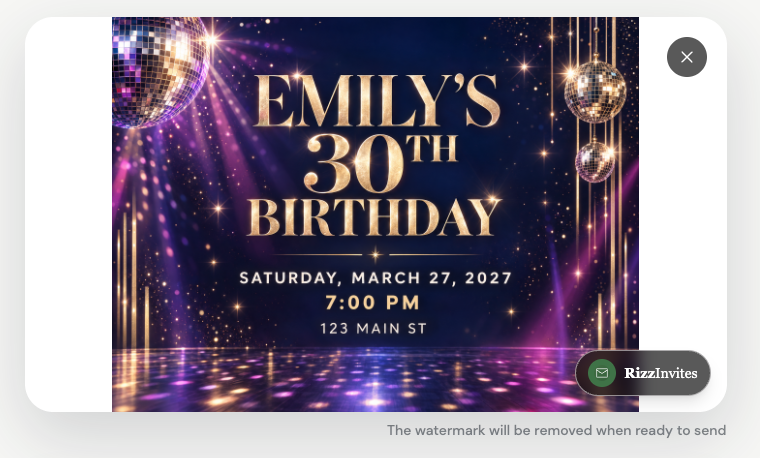
Treat this as your proofreading moment: the invitation should capture the party's personality without making guests work to understand it.
Create Your Own Invitation Here.
How to Set Up and Send Birthday Invitations With Rizz Invites
Once you've created, chosen, or uploaded your card, it's time to organize the event information and invite your guests.
1. Add Your Event Details
Enter the birthday person's name, the party date, the start time, and the venue or address. Include an end time when it will help guests plan, especially for children's parties with a scheduled pickup.
Use your host message to explain anything guests should know before arriving. For example:
“Join us for pizza, cake, and backyard games to celebrate Oliver turning seven! Please wear clothes you don't mind getting messy. Parents are welcome to stay.”
For a birthday dinner, your message might be:
“I'm celebrating another year with good food and my favorite people. Join me for dinner, a little catching up, and something chocolate for dessert.”
Also consider practical questions. Should guests bring swimsuits or socks? Are siblings welcome? Is the party a surprise? Does the restaurant need a final headcount by a particular date?
Make your RSVP instructions clear so guests know when you need their responses.
2. Add Your Guests
Enter your guests' phone numbers, email addresses, or a combination of both.
Before moving on, check names and contact information carefully. For a child's birthday, use the parent or caregiver's contact details so the invitation reaches the person handling the family's schedule.
This is also a good moment to review the size of your gathering. Think about venue capacity, seating, food, and whether each invitation includes an individual, a couple, or a family.
A little attention here makes the next stage of planning much easier.
3. Review and Send Your Invitations
Give your invitation one final check, then send it through Rizz Invites by SMS or email.
Rizz Invites offers free sending for up to 10 guests, with paid options for larger guest lists. Review the guest limit and features of your selected option before sending. There are no subscriptions or ads.
Once invitations are sent, guests can RSVP online rather than leaving you to collect every answer through separate texts, calls, and conversations.
Keep Track of Responses After You Send
Making the card is only part of the process. The next question is the one every host eventually needs answered: who's coming?
With real-time RSVP tracking, you can review responses as guests reply. Use your headcount to plan food, seating, party favors, or a restaurant reservation.
Rizz Invites also sends automatic reminders one day before the event, giving guests another reminder of the upcoming celebration.
As you finalize your plans, review your event information again. When changing any details, check both the event page and any text included in the invitation image so guests receive consistent information.
What Makes a Good Birthday Invitation?
A beautiful design gets attention, but clear information helps people show up ready to celebrate.
Match the invitation to the party. A colorful, playful card can introduce an afternoon of children's games. A simple, elegant design can set the mood for a birthday dinner. Choose a style that feels right for the person and the occasion.
Make the essentials easy to find. The name, date, time, and location shouldn't get lost among decorations or lengthy wording. Preview the invitation on your phone and check whether you can understand it at a glance.
Write like yourself. “Come over for tacos and birthday cake” can be just as inviting as formal wording. You don't need to make a casual gathering sound like a black-tie event.
Answer the obvious questions. Include the details that would otherwise prompt guests to message you individually: what to bring, what to wear, when to respond, and anything important about the venue.
Make the Invitation Personal—and the Planning Simple
You don't need to choose between an invitation that looks thoughtful and a process that fits into a busy day.
Start with a theme you love. Create a custom card, choose a ready-made design, or upload your own. Then add clear event details, invite your favorite people, and keep track of their responses.
Ready to get the celebration started? Use the Rizz Invites invitation maker to turn your birthday party idea into an invitation—and give your guests something to look forward to.
Also Read About: Last Minute Invitations: How To Invite When Time Is Short